Converting a PKCS#12 file from AES to 3DES
Older Microsoft Windows™ systems (like Server 2016) do not support modern encryption methods for PKCS#12 certificate files (recognizable by the file extensions .pfx or .p12). On these systems, it may be necessary to convert an AES-encrypted certificate file to 3DES if an upgrade to a current version is not possible.Please do this yourself at your own risk. Use the script below, which runs on a current version of Windows.
We strongly recommend securely deleting this file after installation.
Option 1:
$PFXfile = "C:\path\to\file\example.pfx"

$Password = 'given_password'


$base64EncodedPfx = certutil -encode $PFXfile "$PFXfile.b64"

$cert = New-Object System.Security.Cryptography.X509Certificates.X509Certificate2

$cert.Import($PFXfile, $Password, [System.Security.Cryptography.X509Certificates.X509KeyStorageFlags]::Exportable)

$cert.Export([System.Security.Cryptography.X509Certificates.X509ContentType]::Pfx, $Password) | Set-Content -Path $PFXfile -Encoding Byte

Remove-Item "$PFXfile.b64"
Option 2:
Or import the SSL server certificate locally into the certificate store.
Check the option "Mark key as exportable".
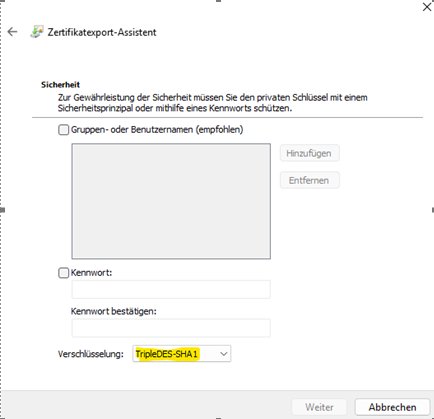
Then export it again, activating the following algorithm: